Explore our new free teacher resource library with tech lessons that integrate social-emotional learning. Check out LEV →

LEV by Tech Unlimited

Back
  • Home
  • Library
  • Studio
  • Continuing Education
  • Events
  • About
  • Tech Unlimited
  • Search
  • Newsletter Signup
  • Privacy Policy
Copyright © Tech Unlimited 2026
Home » Courses
Video

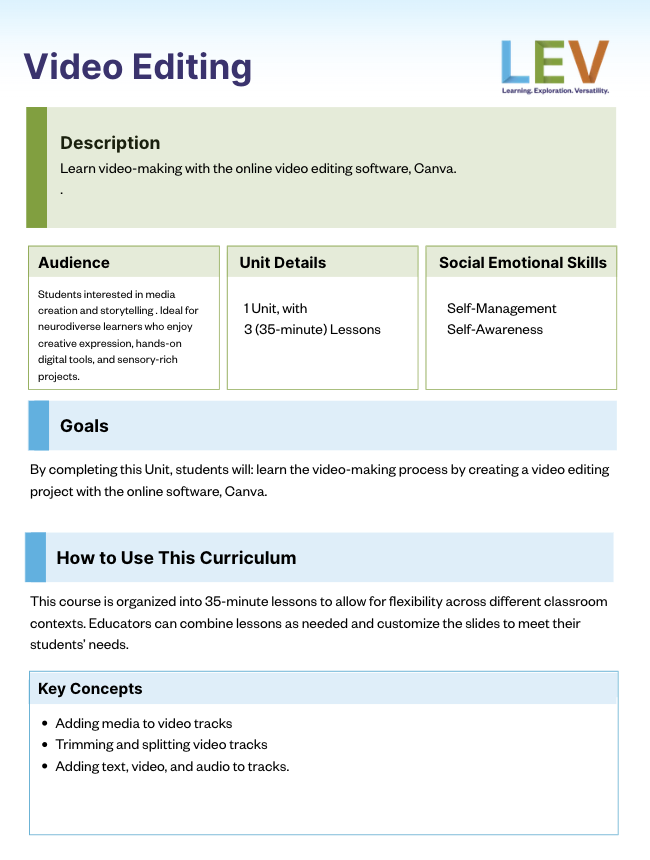
Video Editing

Learn video-making with the online video editing software, Canva.

Who is this course for? Students interested in media creation and storytelling . Ideal for neurodiverse learners who enjoy creative expression, hands-on digital tools, and sensory-rich projects.

Course Length
  • 1 Unit, with 3 (35-minute) Lessons
Social Emotional Learning Skills
  • Self-management
  • Social awareness
Required Skills
  • Basic computer skills (navigating a browser, saving files, etc.)
  • Basic understanding of rhythm and sound (no prior music experience required)
  • Ability to follow guided steps
Materials/Tools Needed
  • A computer (Mac, Windows, or Chromebook) with internet or WiFi.
  • Canva
  • Headphones
  • Optional: microphone for recording custom sounds
  • Optional: pen and paper to write your answers
Table of Contents
  • Overview
  • Units
  • Facilitation Guide
  • Related Courses

Units

  • Unit 1

    Intro to Video

    Students will be able to split and trim video clips, add transitions and text, and export videos using an online editing software.

    By the end of this unit, students will be able to:

    • Learn what video is, how it is made, and where it is used.
    • Get familiar with the Canva interface and workspace.
    • Create and gather media, modify it on the timeline, and add effects to it.
    • Complete a video project.

Facilitation Guide

Video Editing Facilitation Guide

Related Courses

  • Relationship skills Self-management Social awareness

    Generative Video

    Use MiniMax to explore AI video-making: from story development, to video generation, to editing.

    Topic: Artificial Intelligence Video
Home » Courses » Intro to Video

Unit 1

Intro to Video

Students will be able to split and trim video clips, add transitions and text, and export videos using an online editing software.

By the end of this unit, students will be able to:

  • Learn what video is, how it is made, and where it is used.
  • Get familiar with the Canva interface and workspace.
  • Create and gather media, modify it on the timeline, and add effects to it.
  • Complete a video project.

Downloads

Facilitation Guide

Video Editing Facilitation Guide

Units

Lesson 1 Lesson 2 Lesson 3

Tech Unlimited is a 501(c)(3) non-profit organization. EIN: 46-2451747

About

  • Mission
  • Leadership
  • Team Members
  • FAQ
  • Contact

Programs

  • Tech Knowledge Workshops
  • Career Ladder Programs
  • Financial Assistance
  • See Calendar

Resources

  • News
  • Reports
  • Careers
  • Refund Policy
  • Consent Preferences

Newsletter

Sign Up to receive regular updates and announcements from Tech Unlimited.

Subscribe to Newsletter Donate

Copyright © Tech Unlimited 2026

  • Terms of Use